How AI agents work, where they beat chatbots and RPA bots, where they fail and which guardrails they need. With a worked example of the model cost per task at November 2026 list prices.
An AI agent is software that uses a language model to decide what to do next, calls the tools it is allowed to use, checks the result and carries on until a task is finished or a person needs to step in. That last part matters most. The useful agents in business today are not autonomous employees; they are narrow workers with a short list of permitted actions, a clear finish line and a person who approves anything that spends money or contacts a customer.
This guide explains how agents work, where they beat chatbots and scripted automation, where they fail, which guardrails they need and how their running costs behave. It draws on the agents we run in our own products: AI and human agents sharing one workspace in Acmafone CRM, and voice agents that hand calls to people in AI Call Studio.
Key takeaways
- An agent is a loop: the model plans a step, calls a tool, reads the result and decides again. Everything useful and everything risky comes from that loop.
- Use an agent only where the steps genuinely vary from case to case. Where the path is fixed, a workflow or RPA bot is cheaper and more predictable.
- Guardrails are design work, not a setting: narrow tool permissions, approval points, step and spending limits, and a log of every action.
- Agents cost more to run than chatbots because each task makes several model calls, each carrying the growing context. Model choice and prompt caching change the bill by an order of magnitude.
- Test on a set of your own real cases before launch and after every change. A demo proves almost nothing about daily reliability.
What an AI agent is, and what it is not
The word “agent” is used loosely, so it helps to start from a working definition. Anthropic’s engineering team, in its widely cited guide Building effective agents (December 2024), separates two kinds of system:
- Workflows are “systems where LLMs and tools are orchestrated through predefined code paths”. The developer decides the steps; the model fills in parts of them, such as classifying an email or drafting a reply.
- Agents are “systems where LLMs dynamically direct their own processes and tool usage”. The model decides which step comes next and which tool to call.
The same guide recommends “finding the simplest solution possible, and only increasing complexity when needed”. We agree, and it is the first thing we test in any agent project: could a fixed workflow with one or two model calls do this job? Often it can, and that version is cheaper, faster and easier to test.
An agent is not a chatbot with a new name. A chatbot answers questions, usually from a knowledge base. An agent takes actions: it looks up an order, updates a CRM record, creates a ticket, books a slot, drafts a quote and asks for approval. Many real systems combine both, for example a support assistant that answers questions and also checks order status through a tool.
How an AI agent works: the loop
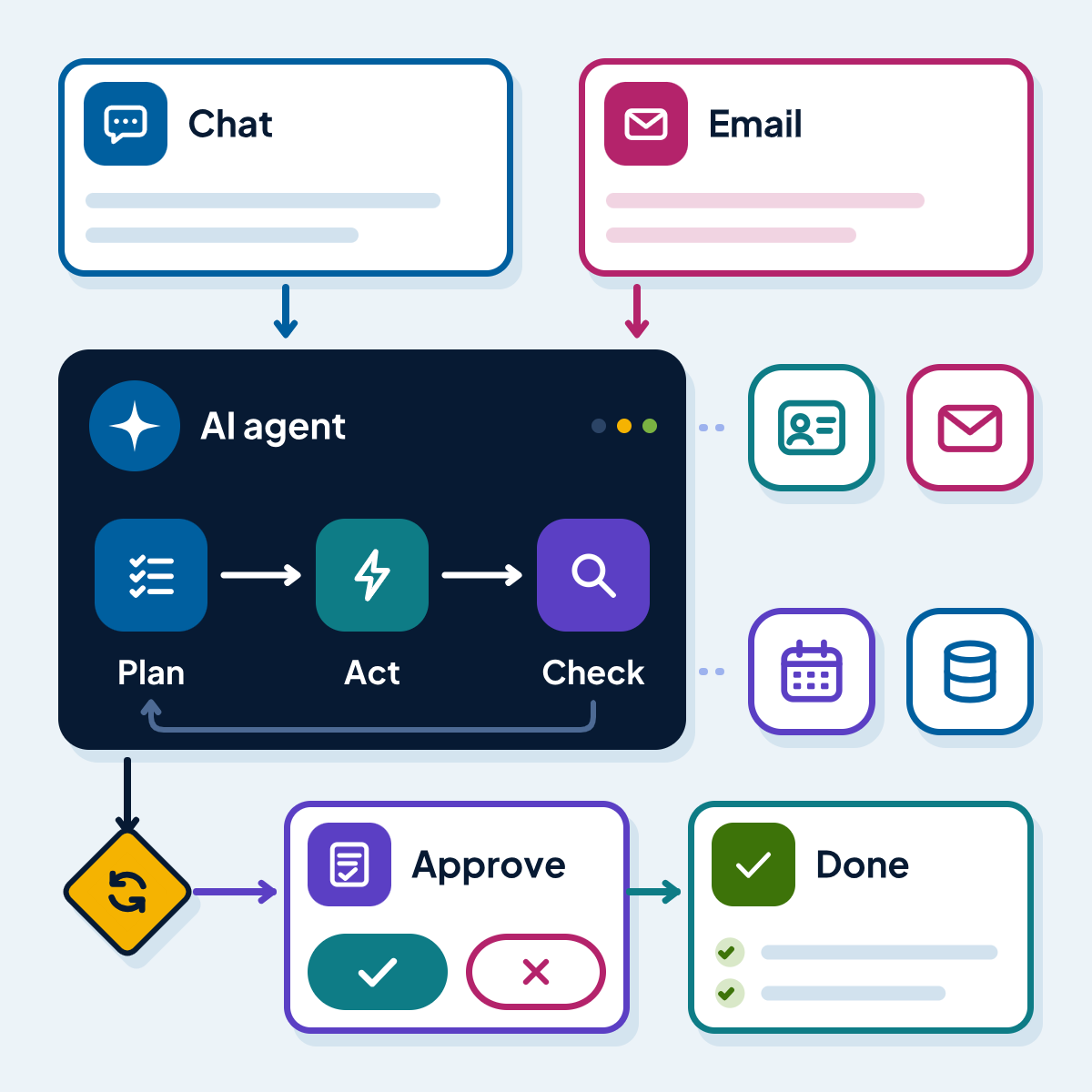
Every agent, however it is branded, runs some version of the same loop.
Step 1: Receive the goal
A request arrives: an email, a chat message, a call, a new record or a scheduled job. The agent gets the goal, the context and the list of tools it may use.
Step 2: Plan the next step
The model reads the goal and everything so far, and decides on one action: call a tool, ask a question, hand over to a person or finish.
Step 3: Call a tool
The application, not the model, executes the call against your CRM, helpdesk, database or API, with the permissions of that agent only.
Step 4: Read the result
The tool's output goes back into the context. The model checks whether the step worked and what it learned.
Step 5: Check the limits
The application counts steps, time and spend, and stops the loop or asks for approval when a rule says so.
Step 6: Finish or hand over
The agent completes the task and records what it did, or passes the case to a person with the full history attached.
Three details are easy to miss. First, the model never touches your systems directly; it asks the application to call a tool, and the application decides whether to allow it. That is where permissions and approvals live. Second, the context grows with each step, because the model needs to see what happened before. That is why agent tasks cost more than single questions. Third, the loop needs explicit limits. Without a maximum number of steps and a spending cap, a confused agent can repeat the same failing call many times.
Tools and the Model Context Protocol
Tools are how an agent acts: functions with a name, a description and typed inputs, such as “get_order_status(order_id)” or “create_ticket(subject, priority)”. All the major model providers support tool calling in their APIs, documented by OpenAI, Anthropic and Google.
The Model Context Protocol (MCP) is an open-source standard for connecting AI applications to external systems; its documentation compares it to a USB-C port for AI applications. An MCP server exposes a system’s tools and data once, and any compatible client can use them. That is useful when several agents or models need the same systems. It does not remove the need for permission design: an MCP server should expose only the actions a given agent needs, with the narrowest access that works.
Memory and state
Agents that run for minutes or hours, or across several conversations, need state that survives a restart: which steps are done, what is waiting for approval, what the customer said last week. That state belongs in your database, not only in the model’s context. It also gives you the audit trail.
Agent, chatbot or RPA bot: which one the task needs
Most automation decisions are not “agent or nothing”. They are a choice between three families with different strengths. The comparison below is how we frame it with clients.
| Feature | AI agent | AI chatbot | RPA bot |
|---|---|---|---|
| Handles requests worded in many ways | Yes | Yes | No |
| Takes actions in other systems | Yes | Partly | Yes |
| Steps vary from case to case | Yes | No | No |
| Works with apps that have no API | Partly | No | Yes |
| Same input always gives the same path | No | Partly | Yes |
| Cost per task | Highest of the three | Low to medium | Low once built |
| Testing effort | High: needs an evaluation set | Medium | Medium: breaks when screens change |
| Best fit | Multi-step cases that need judgement | Questions answered from known content | Fixed, high-volume steps in stable screens |
Source: AcmaSoft delivery practice; definitions from Anthropic, Building effective agents (Dec 2024), and Microsoft Power Automate documentation (desktop flows). Checked 13 Nov 2026.
A planned companion article traces one task through all three to show where each breaks. For the wider automation picture, including workflow tools such as Power Automate and n8n, see our guide to business process automation with RPA, workflow tools and AI agents.
Does this task need an AI agent?
Question 1: Are the steps the same for almost every case?
- YesUse a workflow or RPA bot, with a model call only where text needs reading
- NoGo to question 2
Question 2: Is the main job answering questions from known content?
- YesUse an AI chatbot with retrieval and a handover to people
- NoGo to question 3
Question 3: Can every action the agent needs be exposed as a tool with narrow permissions?
- YesGo to question 4
- NoFix the integrations first, or keep a person doing those steps
Question 4: Can you collect 50 or more real past cases with known correct outcomes to test on?
- YesBuild an agent with approval points, then reduce review as results justify it
- NoRun a short discovery to gather cases before building
Where AI agents pay off
Agents earn their cost where three things are true together: requests arrive in unpredictable forms, finishing them takes several steps across systems, and the volume is high enough that saving a few minutes per case adds up. Some patterns that fit:
Customer support
An agent reads a ticket or chat, identifies the customer, looks up their order or account, applies a documented policy (a refund under a threshold, a delivery reschedule) and either resolves the case or hands it to a person with a summary. The win is not only deflection; it is that cases reaching people arrive pre-researched. We build these as AI customer support agents.
Sales and lead qualification
An agent responds to new enquiries within minutes, asks qualifying questions, checks the CRM for an existing account, books a meeting in a salesperson’s calendar and writes notes back. People stay on the conversations that need judgement and relationship. See our AI sales agent service.
Internal operations and HR
Employee help desks (leave balances, policy questions, equipment requests), onboarding checklists and document collection suit agents well because the users are internal and the tools are known. Screening and evaluating candidates is a different matter: under the EU AI Act, AI used for recruitment and for decisions about workers is listed among the high-risk uses in Annex III. We design AI HR agents for the help desk and admin side, with people making employment decisions.
Voice calls
Voice agents handle routine calls: reminders, appointment booking, order status, first-level qualification. The hard parts are latency, languages and handover. AI Call Studio, the voice agent platform from AcmaTel in our group, runs sales, support and collections calls in Indian languages and Hinglish, and passes a call to a person together with the conversation so far. In attpro CollectOS, our collections platform, AI voice calls in Hindi and regional languages sit in the same strategy as messages, human agents and field visits, and every call adds its recording, transcript and outcome to an audit trail.
AI and human agents in one workspace
The model we find works best in contact centres is not replacement but sharing. In Acmafone CRM, our contact centre software, administrators set up AI agents alongside queues, channels and campaigns, and human agents work calls and conversations in their own console with a copilot panel that suggests replies and finds answers in the knowledge base. The AI handles what it can; people see everything it did and take over where it cannot.
Want a second opinion on your plans?
Tell us what you are working on. A specialist will look at it and reply with practical next steps.
Get in touchWhere AI agents fail
Agents fail in predictable ways. Knowing them is most of the design work.
- Compounding errors. A wrong reading at step two leads to a wrong action at step five. Anthropic’s guide notes that “the autonomous nature of agents means higher costs, and the potential for compounding errors”. Short loops and checks between steps help.
- Prompt injection. Text the agent reads (an email, a web page, a document) can contain instructions that try to redirect it. The OWASP Top 10 for LLM applications lists prompt injection first. The defence is architectural: treat all read content as data, and never give an agent a tool whose misuse you cannot tolerate without approval.
- Excessive agency. OWASP’s LLM06 covers agents with more functions, permissions or autonomy than the task needs. Read access to the whole CRM and the ability to send emails to any address is a common example.
- Unbounded consumption. Loops that never converge burn tokens and money (OWASP LLM10). Step limits and per-task budgets stop them.
- Brittle tools. An agent is only as reliable as the APIs it calls. Timeouts, inconsistent data and unclear error messages confuse models just as they confuse people.
- Unclear finish lines. If a person could not say when the task is done, neither can the agent.
Guardrails every business agent needs
We treat this list as the minimum for any agent that touches customers, money or records. It maps to the risks above and to the govern, map, measure and manage functions of the NIST AI Risk Management Framework.
Agent guardrails before go-live
- Each tool has the narrowest permission that does the job, with read and write separated
- Actions that spend money, change important records or contact customers wait for human approval
- A maximum number of steps, a time limit and a spending cap apply to every task
- Content the agent reads is treated as data, never as instructions, and tool output is checked before use
- Every step, tool call, input and decision is logged with the task and user it belongs to
- The agent hands over to a person when it is unsure, when the customer asks or when a rule says so, with the full history attached
- Personal data sent to the model is limited to what the task needs, and the provider's data terms are checked for each market
- An evaluation set of real cases runs before launch and again after any change to prompts, tools or models
- Dashboards and alerts track success rate, escalations, failures, response times and spend
- A named owner can pause the agent at any time without a code change
Approval points deserve a note. Reviewers should see what the agent proposes and why, and be able to approve, edit or reject in the tool they already use (Slack, Microsoft Teams, email or your own dashboard). Start with every write action approved, then remove approvals one action type at a time as the logs show the agent getting them right.
What AI agents cost
An agent has the same three budgets as any AI system: build, run and improve. Our guide to AI development cost covers build effort in general; here we focus on what is different about agents.
Build cost drivers
- Number and quality of integrations. Each tool needs authentication, error handling, retries and tests. A clean REST API is quick; a legacy system without one may need RPA or a custom connector.
- Approval and handover design. Review screens, notifications and the handover into your helpdesk or contact centre are real product work.
- Evaluation. Collecting and labelling real cases, building the test harness and running it on every change.
- Channels. A web chat agent is lighter than one that also works on WhatsApp and the phone, where speech, latency and telephony add work.
- Compliance needs. Audit trails, data residency and consent records add effort, and some markets require them.
Run cost: why agents use more tokens
Model providers charge per token (roughly, per word fragment) for input and output. A chatbot answer is usually one model call. An agent task is several calls, and each call resends the instructions, the tool definitions and everything that has happened so far. The worked example below shows the effect with list prices.
| Model | Input price per 1M tokens | Output price per 1M tokens | Cost per task | Cost per 1,000 tasks |
|---|---|---|---|---|
| Claude Haiku 5.5 | $0.10 | $0.50 | $0.0064 | $6.40 |
| Claude Sonnet 5.5 | $2.00 | $10.00 | $0.128 | $128.00 |
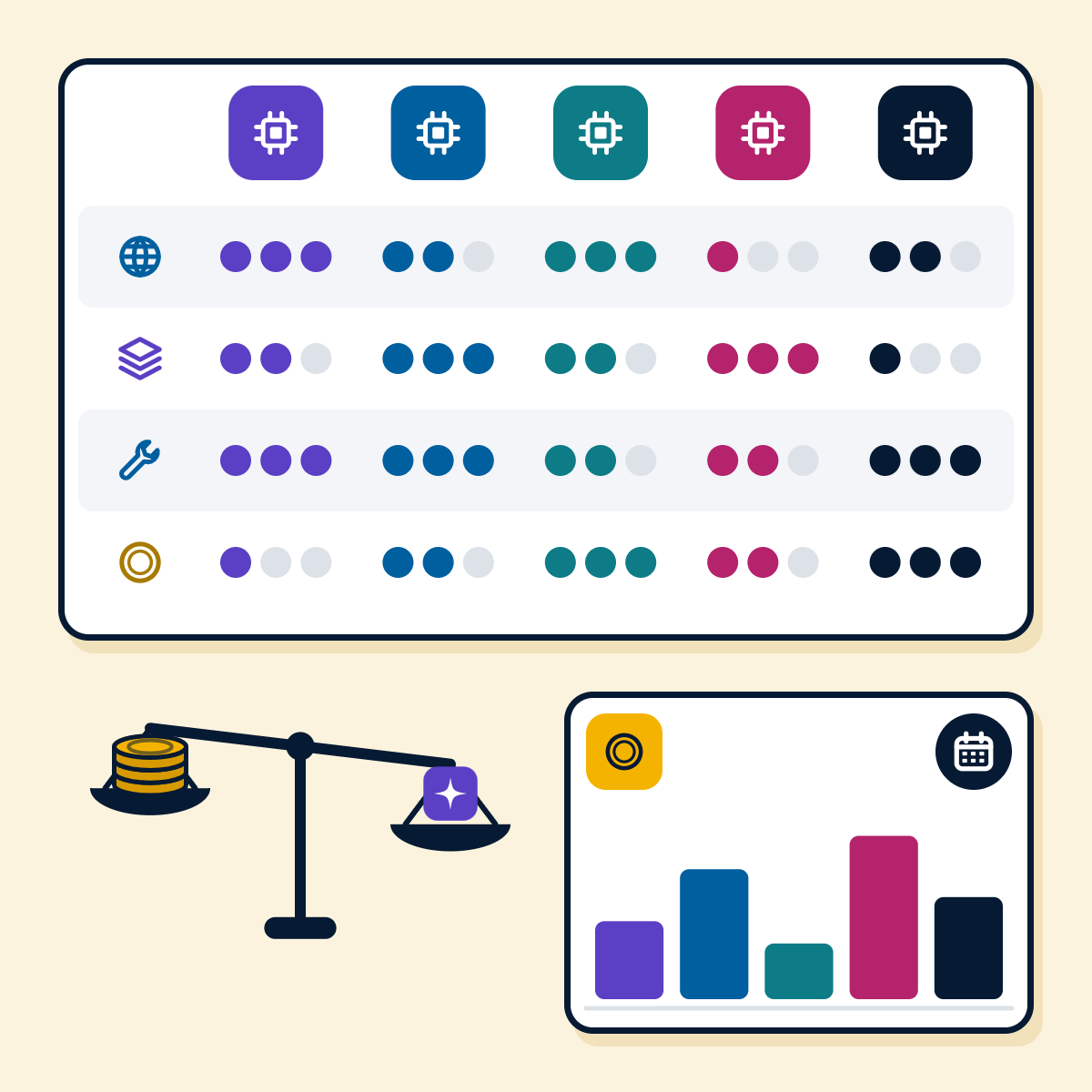
| Claude Sonnet 5.5 with prompt caching | $0.10 cached, $2.00 other | $10.00 | $0.052 | $52.00 |
| GPT-6.1 Sol | $2.00 | $10.00 | $0.128 | $128.00 |
Source: Calculated by AcmaSoft from list prices on the Claude API pricing page (platform.claude.com) and the OpenAI API pricing page (developers.openai.com), standard tier, USD, checked 13 Nov 2026. Assumptions: 8 model calls per task, 6,000 input and 400 output tokens per call on average. Cached case: 5,000 of the 6,000 input tokens read from the prompt cache; cache writes excluded.
Three things follow from the arithmetic. Model choice moves the bill by an order of magnitude or more, so route simple steps (classification, extraction) to a small model and keep the larger model for planning. Prompt caching matters for agents in particular, because most of the input on each call (instructions and tool definitions) repeats; on the Claude API, a cache hit on Sonnet 5.5 is listed at $0.10 per million tokens against $2.00 for normal input. And step limits are a cost control as much as a safety one.
The model bill is rarely the whole run cost. Add hosting for the application and its database, monitoring and logging, telephony and speech services for voice agents, messaging fees for WhatsApp or SMS, and the hours your team spends reviewing approvals and improving the agent. A planned article on running generative AI in production will cover the run bill in detail; our chatbot development cost breakdown does the same exercise for chat and voice assistants.
Prices change often
The prices above are list prices on 13 November 2026. Providers change prices and release new models several times a year, and some regional or data-residency options carry a premium (the Claude API lists a 1.1x multiplier for US-only inference; OpenAI lists a 10% uplift for regional processing on newer models). Recalculate with current prices and your own token counts before you budget.
How to compare run cost with value
Put the cost per task next to what the task costs today. If a person spends ten minutes researching a case before resolving it, the comparison is ten minutes of staff time against the model cost plus the review time that remains. In most business processes the model cost per task is small next to staff time; the larger costs are the review hours and the upkeep. That is why the business case should count review and improvement time honestly.
How to start an AI agent project
A first agent project should be small enough to finish and real enough to measure. The sequence we use:
- Pick one task with volume, a clear finish line and a person who does it today.
- Document the steps, decisions and exceptions with real examples from that person.
- Test feasibility on a handful of cases with current models, and estimate the running cost per task.
- Design the agent: goal, tools, permissions, approval points and when it hands over.
- Build the integrations and the agent, with logging from day one.
- Run the evaluation set, fix what fails and agree the go-live threshold.
- Pilot with full review for a small group, comparing results with the current process.
- Widen access and reduce review where the results justify it.
If you are earlier than that and still deciding where AI fits at all, our AI adoption roadmap covers how to choose and sequence use cases across the business. For the engineering underneath an agent (model gateway, retrieval, tools, evaluation and observability), see how to build an LLM application.
How we build AI agents
Our AI agent development work follows the sequence above, and we will say when a fixed workflow does the job instead. Where it fits we use the Model Context Protocol, so tools can be reused across agents and models. Long-running tasks keep their state in your database, so work survives restarts. Every step is logged, and dashboards show success rates, failures, response times and spend.
Many agent projects sit beside workflow automation: the fixed parts of a process run as ordinary workflows, and the agent handles the steps that need reading and judgement. That mix is usually cheaper and easier to test than an agent doing everything.
Delivery runs remotely from India, with one named lead, sprint demos and a staging environment. Office hours are 9:30 am to 6:30 pm India time, Monday to Saturday, with evening hours for North American clients by arrangement. Clients choose a fixed price for a defined first agent, a dedicated team for an ongoing programme, or time and materials while the scope is still being learned.
Have a task an agent could take on?
Describe the task and the systems involved on our AI agent development page, and we will tell you whether an agent, a chatbot or a plain workflow is the right fit, with a cost per task estimate for the agent route.
Planned articles in this series go deeper on single topics: chatbot versus agent versus RPA bot, the Model Context Protocol, voice agents for call centres, WhatsApp AI chatbots, AI customer support, AI sales agents, AI in HR and recommendation engines.
Get new guides by email
Articles and guides from our team, and company news. Unsubscribe at any time.
About AcmaSoft
AcmaSoft designs and builds websites, mobile apps and custom software, and runs SEO and digital marketing for its clients.
- Years of experience
- 17+
- Clients served
- 650+
- Projects delivered
- 2,000+
- Products shipped
- 300+